

If you’ve spent the last few months working from a kitchen table hunched over a 14-inch laptop screen, you already know the cost: sore neck, squinted eyes, and a productivity dip by 4 PM. A dedicated monitor is the single cheapest upgrade you can make to a home office, and you don’t need to spend a fortune to get one that actually helps. Here are six monitors available in India for under ₹15,000 that are worth your money in 2026, plus what to actually check before you buy.
1. Dell SE2222H (21.5-inch FHD) — Best Overall Budget Pick
Dell’s SE series has been the default “safe choice” for home offices for years, and the SE2222H continues that streak. It’s a 21.5-inch Full HD panel with a 3-sided narrow border design, so it doesn’t look out of place even in a small setup, and Dell’s panel quality at this price point is consistently better than no-name alternatives.
Pros:
- Reliable color accuracy for everyday work and video calls
- Tilt-adjustable stand reduces neck strain
- 3-year Dell warranty with easy India-wide service
Cons:
- No height adjustment on the stand
- Only one HDMI + one VGA port, no USB-C
Who Should Buy This? Anyone who wants a no-fuss, dependable monitor for spreadsheets, email, and video calls without worrying about panel quality or after-sales support.
2. LG 24MP400-B (24-inch FHD IPS) — Best Screen Size for the Price
LG packs a 24-inch IPS panel into this one, which means wider viewing angles and noticeably better color than the cheaper VA/TN panels at this price. If you’re moving from a laptop screen, the jump in real estate alone changes how you work — you can finally keep two windows open side by side without squinting.
Pros:
- IPS panel gives accurate colors from almost any angle
- AMD FreeSync support for smoother scrolling and video
- Slim bezel design suits dual-monitor setups
Cons:
- Stand only tilts, no height or swivel adjustment
- Speakers are basic and best avoided
Who Should Buy This? Remote workers who want the biggest, sharpest screen for the money and plan to eventually run a two-monitor setup.
3. Samsung F24T350FHW (24-inch FHD) — Best for Eye Comfort
Samsung’s Eye Saver Mode and flicker-free backlighting make this one stand out if you’re doing 8+ hour days in front of the screen. It’s not the cheapest 24-inch option here, but for people who get headaches from long screen sessions, this is the one to prioritize.
Pros:
- Flicker-free + low blue light modes genuinely reduce eye fatigue
- Borderless design on three sides looks premium
- Good built-in color presets for design or photo work
Cons:
- Stand is fixed-tilt only, no height adjustment
- Limited port selection (HDMI + VGA only)
Who Should Buy This? People who already deal with eye strain or migraines from screen time and want comfort features over extra ports.
4. Acer EK220Q (21.5-inch FHD) — Best Under ₹8,000
If your budget is tight, the Acer EK220Q gets you a usable FHD monitor for less than the cost of a nice dinner out. It won’t wow anyone, but for basic browsing, documents, and email, it does the job without complaint.
Pros:
- One of the cheapest reliable FHD monitors available
- Lightweight and easy to mount or move around
- Acer’s reliability track record at this price tier is solid
Cons:
- Color accuracy is noticeably weaker than the LG or Samsung above
- No ergonomic adjustment beyond tilt
Who Should Buy This? Students or anyone setting up a second/backup monitor on a strict budget who doesn’t need color-accurate work.
5. HP M24fw (23.8-inch FHD IPS) — Best Design
HP’s M-series monitors punch above their price in build quality. The M24fw has an almost-borderless IPS display and a stand that feels sturdier than most competitors in this range, which matters if your desk gets bumped often.
Pros:
- Premium-feeling build and finish for the price
- IPS panel with good color and viewing angles
- HP’s Eye Ease certification for reduced blue light
Cons:
- Sits at the upper end of this budget range
- No USB-C or height-adjustable stand
Who Should Buy This? Anyone who wants their desk setup to look as good as it functions, without crossing into premium monitor pricing.
6. BenQ GW2480 (24-inch FHD) — Best for Long Work Sessions
BenQ built its reputation on “Eye-Care” monitors, and the GW2480 is the budget end of that lineup. Brightness Intelligence Plus automatically adjusts screen brightness based on room lighting, which is genuinely useful if your desk sits near a window.
Pros:
- Automatic brightness adjustment based on ambient light
- Flicker-free technology across all brightness levels
- Comfortable for 8+ hour workdays
Cons:
- Design is plain compared to the HP or LG
- Limited connectivity (HDMI, VGA, DVI — no USB-C)
Who Should Buy This? Anyone working near a window or under variable lighting who wants the screen to adjust automatically instead of doing it manually all day.
What to Check Before You Buy a Budget Monitor
Panel type: IPS panels (LG, Samsung, HP, BenQ above) give better color and viewing angles than VA or TN panels. If you’ll ever have someone looking at your screen from the side during a call, IPS is worth the small premium.
Stand adjustability: Most budget monitors only tilt. If you need height adjustment for ergonomics, check the spec sheet carefully — it’s the first feature cut to hit a lower price.
Ports: Almost nothing under ₹15,000 has USB-C. Make sure your laptop has a free HDMI port, or budget an extra ₹500–800 for an adapter cable.
Eye comfort features: Flicker-free backlighting and low blue light modes matter far more than people expect once you’re staring at a screen for 8+ hours a day, every day.
Final Verdict
For most home offices, the LG 24MP400-B is the best balance of screen size, IPS color quality, and price. If eye strain is your main concern, spend the extra and go with the Samsung F24T350FHW or BenQ GW2480. And if you just need a second screen on a tight budget, the Acer EK220Q gets the job done without complaint.
Disclosure: This post contains Amazon affiliate links. We may earn a small commission on qualifying purchases at no extra cost to you.
| Product | Details | Price |
|---|---|---|
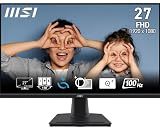 |
MSI PRO MP275 27-inch FHD Monitor Best Overall |
Buy Now |
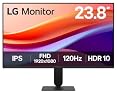 |
LG 24U411A-B 24-inch IPS 120Hz Monitor Best Budget 24″ |
Buy Now |
 |
Dell SE2426H 23.8-inch 144Hz IPS Display Best for Multitasking |
Buy Now |
 |
LG 27GS50F-B 27-inch UltraGear 180Hz Premium 27″ Pick |
Buy Now |
MSI PRO MP275 27-inch FHD Monitor
27-inch Full HD IPS with built-in speakers, 100Hz refresh, and eye-care display. Perfect for long work sessions. Flicker-free and anti-glare. Under ₹10,000.
LG 24U411A-B 24-inch IPS 120Hz Monitor
24-inch IPS, 120Hz, HDR10 with Reader Mode for fatigue-free reading. Slim stand and great colour accuracy — ideal for spreadsheets and documents.
Dell SE2426H 23.8-inch 144Hz IPS Display
Dell reliability with 144Hz refresh and 1ms response. Wide viewing angles for split-screen productivity. AMD FreeSync built-in. Prime delivery.
LG 27GS50F-B 27-inch UltraGear 180Hz
27-inch UltraGear with 180Hz refresh and HDR10. Virtually borderless design. Handles both office work and weekend gaming without compromise.