
Finding the right laptop as a student in India is genuinely hard. You need something powerful enough for coding, presentations, or design work — but your budget is real, and ₹40,000 is where most students draw the line. The good news: in 2026, that budget gets you a genuinely capable machine from a trusted brand. The bad news? There are dozens of options and too many misleading spec sheets.
We’ve narrowed it down to the 5 best laptops for students under ₹40,000 in India — covering engineering, arts, commerce, and general-purpose use. Here’s everything you need to know before you buy.
What to Look for in a Student Laptop Under ₹40,000
Before jumping to the list, here’s a quick checklist of what actually matters for student use in India:
- Processor: 12th Gen Intel Core i5 or AMD Ryzen 5 5000 series minimum. Avoid Celeron and Pentium — they’ll frustrate you within months.
- RAM: 8GB is the floor. 16GB is ideal for multitasking, Chrome tabs, and running software simultaneously.
- Storage: 512GB SSD is the sweet spot. Avoid HDD-only laptops — they’re painfully slow for modern workloads.
- Battery life: Aim for 7+ hours real-world. College students can’t always find a power socket.
- Display: A Full HD (1920×1080) IPS display makes a massive difference for long study sessions.
- Weight: Under 1.8kg is ideal for daily carry in a college bag.
1. Lenovo IdeaPad Slim 3 (12th Gen Intel Core i5)
The Lenovo IdeaPad Slim 3 is arguably the most popular student laptop in India right now, and for good reason. It delivers reliable performance, a solid display, and excellent build quality — all at a price that won’t break a student’s budget.
Key Specs: Intel Core i5-1235U | 8GB RAM | 512GB SSD | 15.6″ Full HD IPS | Windows 11 | ~6–7 hours battery
Pros:
- Excellent keyboard — one of the best in this price range for long typing sessions
- Slim and lightweight at 1.62kg — easy to carry every day
- Reliable brand with good service centres across India
- Handles Office, Zoom, Chrome, and light coding without breaking a sweat
Cons:
- No dedicated GPU — not for gaming or video editing
- Webcam is basic — expect grainy video in online classes
- Only 8GB RAM (not upgradeable on all variants)
2. ASUS VivoBook 15 (AMD Ryzen 5 5500U)
If you want more processing power for the money — especially for multitasking and data-heavy tasks — the ASUS VivoBook 15 with Ryzen 5 is a powerhouse at this price. AMD’s Ryzen 5 5500U often outperforms similarly priced Intel chips in multi-core tasks.
Key Specs: AMD Ryzen 5 5500U | 8GB RAM (upgradeable) | 512GB SSD | 15.6″ FHD | Windows 11 | ~8 hours battery
Pros:
- Excellent multi-core performance — great for Python, data science tools, and heavy browser tabs
- RAM is upgradeable — you can bump it to 16GB later for ₹2,000–3,000
- Bright, vibrant display with good colour accuracy for design students
- Solid build quality with an ASUS warranty network across India
Cons:
- Slightly heavier at 1.8kg
- Fans can get audible under heavy load
- No backlit keyboard on base variants
3. HP 15s (AMD Ryzen 5 7520U)
HP’s 15s series is trusted by students across India for one reason: it just works. The newer Ryzen 7000 series chip in this model is significantly more efficient, which translates directly to better battery life — a real-world advantage for full college days.
Key Specs: AMD Ryzen 5 7520U | 8GB RAM | 512GB SSD | 15.6″ FHD | Windows 11 Home | ~9 hours battery
Pros:

- Outstanding battery life — one of the best in this segment
- HP’s service network is among the best in India for student support
- Sleek, professional design — looks good in college and internships
- Latest gen Ryzen 7000 chip with great efficiency
Cons:
- Display can be dim in bright outdoor conditions
- Fewer ports compared to older HP models
- Price can vary significantly — watch for deals on Flipkart and Amazon
4. Acer Aspire Lite (12th Gen Intel Core i5-1235U)
Acer’s Aspire Lite is a sleek, thin-and-light option that punches above its weight for casual students. It’s one of the lightest laptops in the sub-₹40,000 segment and handles day-to-day academic work with ease.
Key Specs: Intel Core i5-1235U | 8GB RAM | 512GB SSD | 15.6″ FHD | Windows 11 | 1.59kg
Pros:
- Extremely lightweight — ideal for students who commute daily
- Modern 12th gen Intel chip handles productivity tasks well
- Good port selection: USB-A, USB-C, HDMI, headphone jack
- Clean, premium-looking design
Cons:
- Battery life is average compared to Ryzen alternatives
- Build feels slightly plasticky under pressure
- Acer service centres can be inconsistent in smaller cities
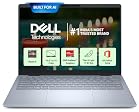
5. Dell Inspiron 15 3000 (AMD Ryzen 5)
Dell’s Inspiron 15 remains a classic choice for engineering and commerce students who want a no-nonsense, reliable machine backed by excellent after-sales support. Dell’s pan-India service network is one of the strongest in the business.
Key Specs: AMD Ryzen 5 | 8GB RAM | 512GB SSD | 15.6″ FHD | Windows 11 | Dell SupportAssist
Pros:
- Best-in-class after-sales support across India, including Tier 2 and Tier 3 cities
- Solid build quality — Inspiron series is well-known for durability
- Good keyboard and display combo for long academic sessions
- Easy to get repaired or serviced under warranty
Cons:
- Heavier and bulkier than the competition at 1.9kg
- Design feels dated compared to Lenovo and ASUS
- Can be slightly overpriced for the specs — wait for sale events
Quick Comparison: All 5 Laptops at a Glance
| Laptop | Processor | RAM | Battery | Weight | Best For |
|---|---|---|---|---|---|
| Lenovo IdeaPad Slim 3 | Intel i5-1235U | 8GB | ~7 hrs | 1.62 kg | All-round use |
| ASUS VivoBook 15 | Ryzen 5 5500U | 8GB (upgradeable) | ~8 hrs | 1.8 kg | Power users, coders |
| HP 15s | Ryzen 5 7520U | 8GB | ~9 hrs | 1.69 kg | Battery-first buyers |
| Acer Aspire Lite | Intel i5-1235U | 8GB | ~6 hrs | 1.59 kg | Commuters, lightweight use |
| Dell Inspiron 15 | Ryzen 5 | 8GB | ~7 hrs | 1.9 kg | Durability + service |
Who Should Buy Which Laptop?
Here’s a quick decision guide based on your stream and priorities:
- Engineering / CS students: Go with the ASUS VivoBook 15 — the Ryzen 5 5500U handles coding, compilers, and virtualisation much better than similarly priced Intel variants. The upgradeable RAM is a bonus.
- Commerce / MBA students: The Lenovo IdeaPad Slim 3 is perfect — great keyboard, slim design, and enough performance for Office, Zoom, and Excel.
- Daily commuters: Pick the Acer Aspire Lite — at 1.59kg, it’s the lightest on this list and won’t hurt your shoulder after a long college day.
- Battery-conscious students: The HP 15s with Ryzen 7000 is your best bet — expect close to a full workday on a single charge.
- Students in smaller cities who need reliable service: Go with Dell Inspiron 15 — Dell’s service network is unmatched in India.
Final Verdict
If we had to pick one winner for most students, it would be the Lenovo IdeaPad Slim 3 — it balances performance, portability, and reliability without any obvious weaknesses. But if you’re a coder or data student, the ASUS VivoBook 15 is the smarter long-term investment.
Always buy during Amazon Great Indian Festival, Flipkart Big Billion Days, or during the start of the academic year (June–July) — you can save ₹3,000–6,000 on these exact models during sale periods.
Have a different laptop you’d recommend for Indian students? Drop it in the comments — we’d love to hear what’s working for you!